Who is behind your child's GPS watch?
Consumer Reports found kids GPS trackers that skip the second login step, and the cheapest watches run on shared platforms the buyer cannot name. Here is how to check the one on your child's wrist.


Nobody buys a kids GPS watch carelessly. The purchase itself is an act of caution. You wanted to know where your child is without giving them a phone, and the watch is a practical solution.
There is a question that many don't think about before checkout. Who else can see my child's location?
On the best devices, the people who can see the data are the people you would expect. On the cheapest ones, the buyer usually cannot even name the company holding the data. The good news is that you can find out exactly what is inside the watch already on your child's wrist, and most fixes are at the account level.
What the watch does
Most kids' GPS watches are small phones. There is a SIM card inside. The watch finds itself in three ways: by GPS satellite, nearby cell towers, and Wi-Fi networks. Everything it learns goes to the manufacturer's servers, and the parent app talks to the watch through those same servers. When you tap the map, the request goes to the company's servers, and the server asks the watch.

Most watches come with features such as two-way calling, voice messages, an SOS button, alerts when the watch leaves a location zone you set. Many inexpensive models also carry a listen-in feature that opens the microphone remotely, with nothing on the watch to show it happening. Every one of these is sold as a parental tool, and every one of them belongs to whoever has access to the account.
Germany's telecom regulator found the listen-in feature alarming enough that it banned children's smartwatches carrying it back in 2017 and told parents to destroy the ones they owned. Nine years later, the feature still appears on inexpensive models.
This piece is about the watch itself and the company behind it. How a family shares location with each other is a separate subject, and we covered it earlier this month.
What Consumer Reports found
Consumer Reports published testing of 15 popular child-tracking devices in December 2025, looking at how well each company protects sensitive information through encryption, data-sharing policies, and default settings.
The finding that stood out was around logins. Four of the devices skip multi-factor authentication entirely: the Cosmo JrTrack 5 Kids Smart Watch, the Life360 Tile Mate, the Tack GPS Tracker, and the Tracki GPS Tracker. With no second login step, a leaked or reused parent password is live access to a child's location. CR inquired with all four companies about it, and the three that answered said MFA is on the way in some form.
Encryption came up too. CR researcher Justin Stewart, on the Fitbit Ace LTE: "I was astonished that the Fitbit logged all of the direct messages between the parent app and the child's smartwatch in an unencrypted database." Fitbit responded that the data is encrypted in transit and at rest and that messages are automatically deleted a short time after delivery. That is a valid security standard, but it is not end-to-end encryption.
Five of the devices, from AngelSense, Bark, Fitbit, Cosmo, and TickTalk, do not clearly show when the microphone or camera is active. And Stewart was surprised by how many products collect data for advertising. Only two of the 15, the Life360 Tile Mate and the Xplora XG03, offer controls in the app to decline targeted ads.
The counterintuitive finding is that products made for children were not the safest ones. CR found that companies governed by stricter global standards, and it names Apple and Samsung, tended to rate higher for privacy and security even when the product was never designed for a child. Devices from Apple, Garmin, and Eufy performed well in the testing, while several watches marketed specifically for kids lagged behind them.
These work without giving your child a phone, too. An Apple Watch with cellular can be set up and managed entirely from a parent's iPhone, and the Garmin Bounce runs on LTE and pairs to an app on the parent's phone.
The brand on the box
Consumer Reports tested the apps and the policies. The bigger problem sits a level below that, on the servers the cheapest watches all share.
The cheapest watches, the ones sold under dozens of interchangeable names in marketplace listings, mostly do not have their own servers at all. They run on shared platforms built by manufacturers in Shenzhen. The brand on the box is a sticker on another company's system.
In August, at the DEF CON 34 security conference in Las Vegas, researchers Felipe Solferini and Vangelis Stykas presented what they found inside three of those platforms. By their own estimate, the platforms serve tens of millions of devices across dozens of brand names, and the largest of the children's watch platforms is called SETracker. WIRED's Andy Greenberg reported on the research and let the pair demonstrate it on a watch he wore himself. They located him, listened through the microphone, and triggered the camera, with nothing showing on the watch. So far WIRED is the only outlet that has reported the findings firsthand, no independent lab has re-tested the watches, and the device counts are the researchers' own figures.
The company behind SETracker did respond. Wonlex, the Shenzhen manufacturer that runs the platform, posted a security update on August 10 acknowledging that researchers had presented findings at DEF CON and saying it closed the specific holes at the server level, so nothing needs updating on the watches themselves. That is a better response than silence. It is also a company evaluating itself, with no outside audit published.
No case has surfaced of a child harmed through any of these flaws. What the researchers showed is capability, and the capability lives in the account and the platform. Both are things you can check.
Find out what is inside the watch
The single most useful check needs your phone and the watch's companion app.
- Find the app the watch pairs with. It is named on the box, in the manual, or already sitting on your phone.
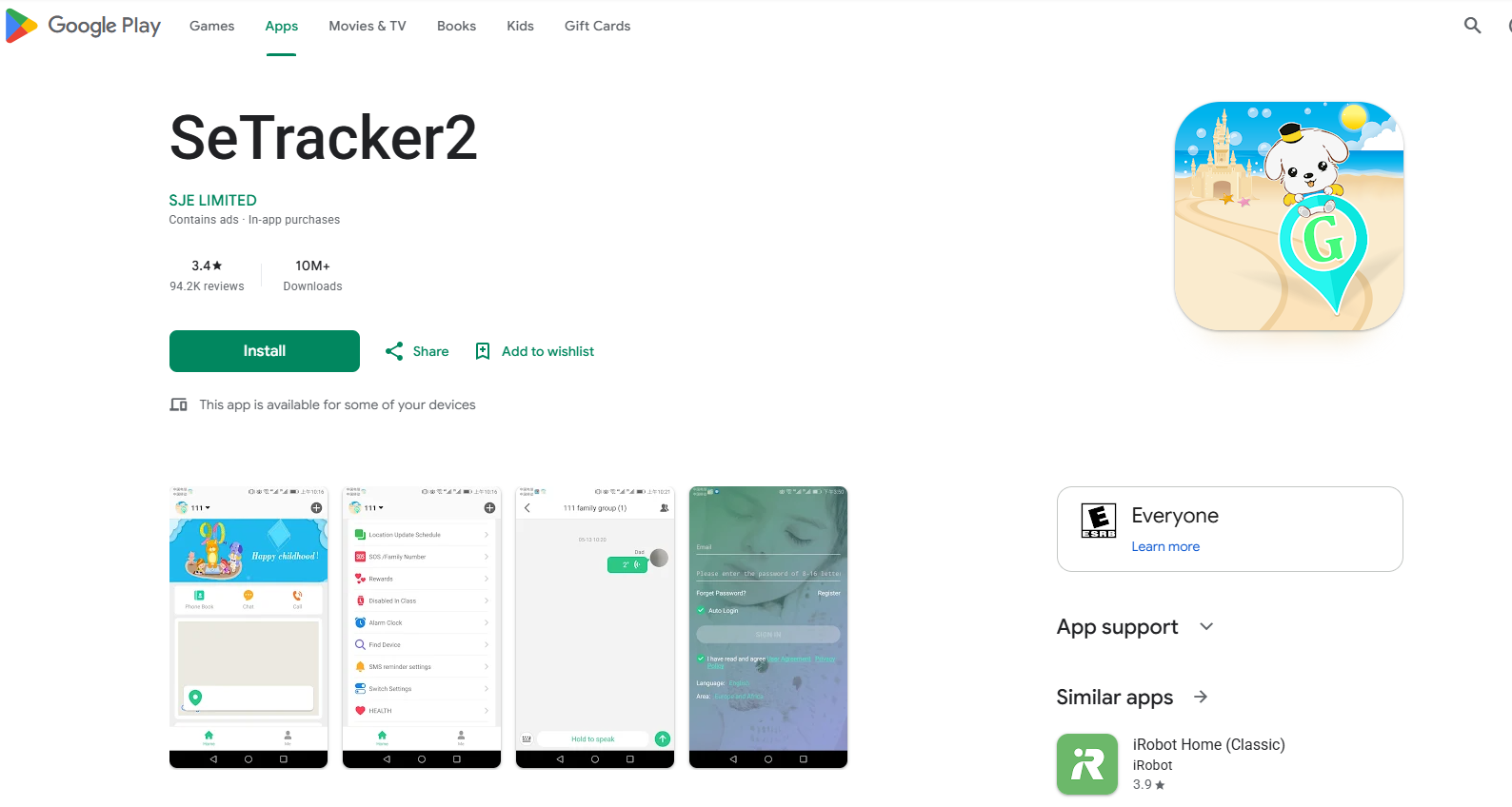
- On Android, open the app's page in the Google Play store and look at the web address. It ends with the app's real internal name. That name tells you whose system you are on. SeTracker2's address ends in com.tgelec.setracker, and the listed developer is SJE LIMITED.
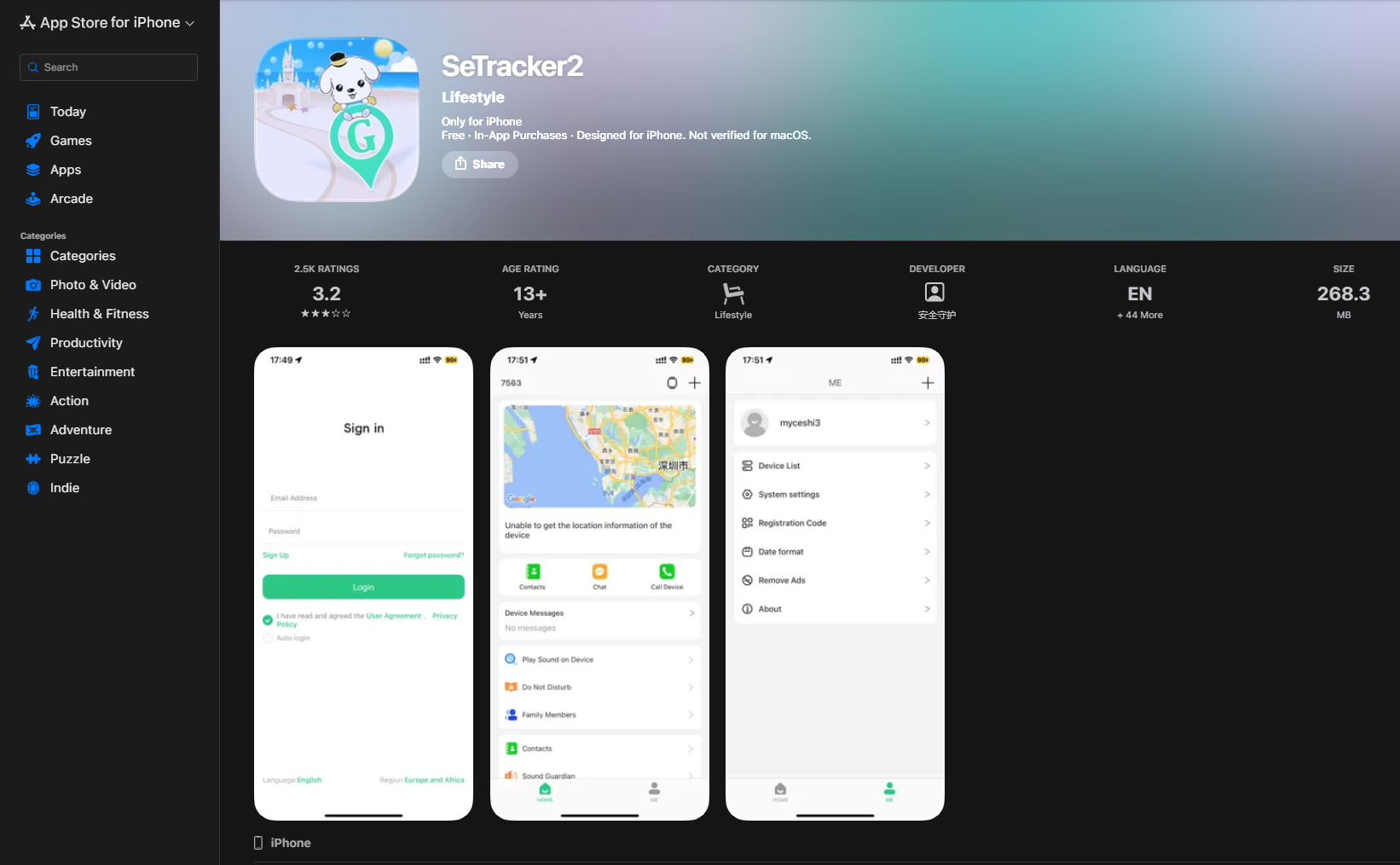
- If the app is called SeTracker, SeTracker2, or Aibeile, the watch runs on the shared platform from the DEF CON research, alongside dozens of other brands.
- On an iPhone, read the developer name printed under the app's title in the App Store.
- Open the app's privacy policy and find who is named as the data controller. That is the company actually holding your child's location. If it matches the brand you bought, you own a product. If it is a company you have never heard of, you own a sticker.
What you can change today
A few steps you can take, in the order they help:
Turn on multi-factor authentication if the app offers it. This is the single change that closes off the most realistic problem, which is a password that leaked from some other site years ago. If the app has no MFA option at all, the password becomes the only lock on your child's location, so it needs to be one you use nowhere else. A password manager makes that true without you having to remember anything.
Change any default PINs. Many of these watches come with a factory admin code and SOS code that most buyers never touch. Set your own.
Take stock of who has the login. Anyone who has ever had the email and password can see the watch until the password changes, including a former partner from when the account was first set up. Change the password and this is settled.
Look for a security contact. Search the maker's website for a security page or any way to report a problem. Companies that publish one tend to fix things. If the site has no way to reach anyone about security, that tells you how a problem would go.
When replacing it is the right call
If the check above ends with a shared-platform app, a developer you cannot name, no MFA, and no security contact, replace the watch. Replace it because the account cannot be secured and nobody accountable is holding the data. That is the same problem as marketplace hardware with no accountable seller, wearing a watch band.
When you shop for the replacement, buy on properties instead of brand names:
- Multi-factor authentication: Ensure it is available.
- A named company: Look for a published security contact.
- A clear indicator: Find a clear light or icon when the microphone or camera is on.
- A stated data policy: Verify how long data is kept.
- Advertising controls: Ensure there are toggles to decline targeted ads.
The brands that tested well are easy to find, and a device that meets those properties is a reasonable pick even if the brand isn't as well known.
For most families the realistic risk comes down to an old password still working on an account without proper security controls. The entire point of buying this watch is to worry less. So lock down the account, and let the watch do its job.
Sources
- Consumer Reports: Should You Track Your Child With a GPS Tracker or Kids Smartwatch? (Dec. 18, 2025)
- WIRED: Hackers Stalked Me by Hijacking a Smartwatch for Kids (Aug. 7, 2026)
- DEF CON 34: Speakers, Tracking the Trackers
- Wonlex: SETracker Security Update (Aug. 10, 2026)
- Google Play: SeTracker2 listing
- TechCrunch: Germany bans smartwatches for kids over spying concerns (Nov. 17, 2017)
- Apple Support: Set up Apple Watch For Your Kids
- Garmin: Bounce 2 Owner's Manual, pairing with a parent's phone