Can you stop AI companies from training on what you write?
The opt-out settings are real, they only work going forward, and they only bind companies that choose to honor them. What each one actually does, and the one place you have real power.


This question doesn’t just apply to writers. A recipe posted to a Facebook group. A review you left for your plumber. The newsletter you type up for the neighborhood association. If it was public on the internet, chances are good it helped teach an AI system how to write. The models learned from the public web, and the public web is mostly us.
Over the past couple of years, the places where people write have added settings that tell AI companies to leave your words out of it. Every setting is a request that only binds companies choosing to honor it. And none of them are retroactive. What you get is a say over your future writing. With past writings, you have almost none.
One disclosure before we start. I use AI tools to help produce parts of this site. That is a different arrangement from the one this article is about. Using a finished tool is one thing. Having your words absorbed into how that tool works is another. You can be fine with one and object to the other. As for this site, it does not block AI crawlers today. I understand why plenty of people do.
What "trained on" actually means
A crawler is an automated program that reads web pages by the millions, no person at the keyboard. AI companies run crawlers to collect text, and training is what happens next. The model does not keep your post as a file it could hand back. Your words get absorbed, along with everyone else’s, into how it writes.
That is also why none of this works backward. A file can be deleted. What a model already learned cannot be unlearned. Every control below is about what happens from here on out.
Where the settings are
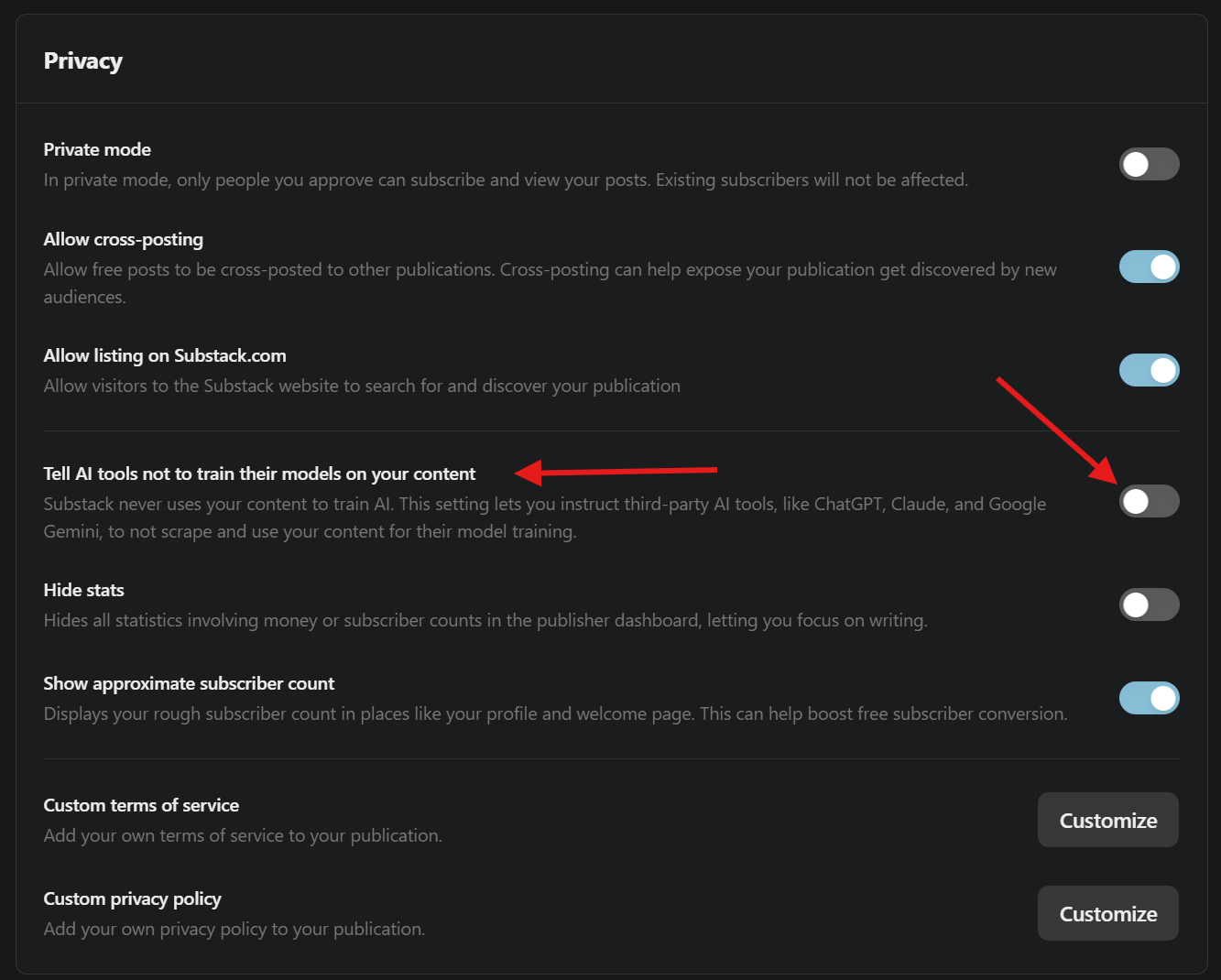
If you write on Substack, the setting is called "Tell AI tools not to train their models on your content." Open your Dashboard, then Settings, then Privacy. Substack says it never trains on your writing itself, so what this control does is pass the request along to everybody else. Substack is also upfront about the limits. Its own help page says the setting "will only apply to AI tools that respect this setting," and warns that blocking training "may limit your publication’s discoverability" in tools that answer with AI. Both caveats are true, and we will come back to the second one.
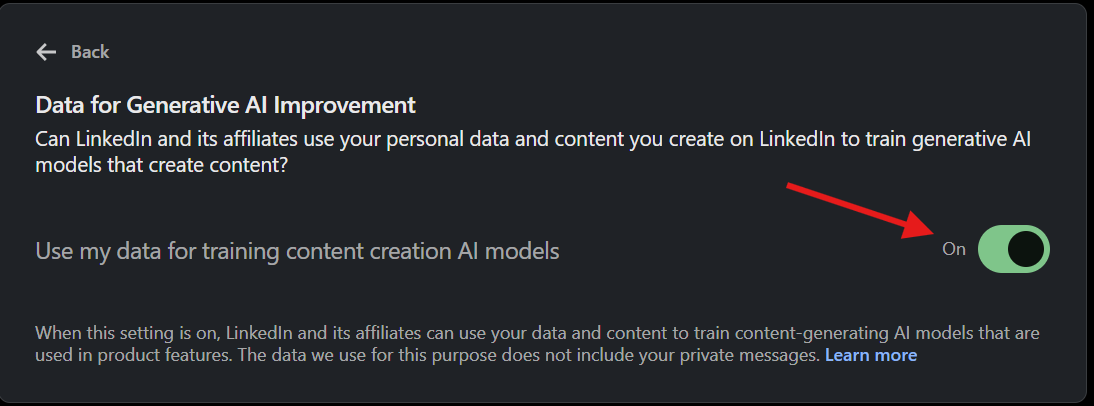
If you post on LinkedIn, the setting is "Use my data for training content creation AI models," under Settings & Privacy, Data privacy, then "Data for Generative AI Improvement." In the US it is on by default, which means LinkedIn has been training on your posts unless you already told it not to. Your private messages are not part of it, which LinkedIn says on the setting screen itself. Turning it off stops future use. Nothing already used gets pulled back.
Facebook and Instagram are the bad news. Meta trains its AI on public posts, photos, and captions from adult accounts, and in the US there is no off switch. What exists is a form where you can object, which Meta reviews case by case with no promise to say yes. Europeans got an enforceable right to object under their privacy law. US users did not.
Finding the form is the hard part, because Meta keeps it several clicks down. Open Settings and privacy, then Privacy Center, then Privacy topics, then AI at Meta. From there you are looking for the detailed information about Meta’s generative AI models, and inside that, the part about privacy and generative AI. The link you want is the one offering to let you submit requests. It asks where you live, your email address, and why you are objecting. The practical move is blunter. Meta trains on public content, so switching your account to private protects what you post from now on. The public posts already collected stay collected.
If you have your own website, the control is a file called robots.txt. It is a plain text file that sits at yoursite.com/robots.txt and asks named crawlers to stay out. The names to know are GPTBot (OpenAI), ClaudeBot (Anthropic), Google-Extended (Google’s AI training), and CCBot (Common Crawl, a public collection of web pages that many models were built from).
Blocking them means adding two lines per crawler to that file, the name and the instruction:
User-agent: GPTBot
Disallow: /

User-agent: ClaudeBot
Disallow: /

User-agent: Google-Extended
Disallow: /

User-agent: CCBot
Disallow: /
The slash means the whole site. If your site already has a robots.txt, add these to the bottom and leave the rest alone. If it does not, this is the whole file.
Site builders will do this for you. Squarespace has a "Block known artificial intelligence crawlers" checkbox under Settings, then Crawlers, unchecked by default. WordPress.com has a toggle called "Prevent third-party sharing." And one worry you can cross off. Google states outright that blocking Google-Extended "does not impact a site’s inclusion in Google Search nor is it used as a ranking signal." Telling Google’s AI no does not make your site disappear from Google search results.
Reddit has no individual setting. Reddit licenses its content to AI companies at the company level, and your comments are part of the deal.
The honor system, and who got caught breaking it
Everything above is advisory. Nothing enforces robots.txt. It works because OpenAI, Anthropic, and Google all publicly commit to honoring it for their training crawlers, and there is independent evidence that at least some of them do.
Then there is Perplexity. In August 2025, Cloudflare, the infrastructure company that handles traffic for a large share of the web, published evidence that Perplexity was crawling sites that had blocked it. The report describes Perplexity disguising its crawler as an ordinary Chrome browser and rotating its network addresses to get around blocks. This includes brand-new test sites whose robots.txt said keep out. Cloudflare pulled Perplexity’s verified-bot status. Perplexity denied it and called the report a sales pitch. You can read the evidence yourself and decide. The point survives either way. A request only restrains companies that choose to be restrained.
One more wrinkle. The AI assistants that visit a page because a user asked follow different rules. OpenAI’s own documentation says robots.txt rules "may not apply" when a person triggers the visit, and Perplexity’s says its user-triggered fetcher "generally ignores robots.txt rules." Blocking training and blocking every AI visit are two different projects.
There is a harder truth underneath both. For ordinary writing on the web, you cannot find out whether your words were used. No AI company publishes a list of the pages its models learned from, and the lookup tools that exist cover images and pirated books, not your posts. A company can promise to skip your site, and you have no way to audit the promise. The policy is all there is.
About that $1.5 billion settlement
In July a judge gave final approval to Anthropic’s $1.5 billion copyright settlement. But read the fine print before you get hopeful. The settlement covers published books, registered with the US Copyright Office, that Anthropic downloaded from two specific pirated-book collections. About 482,000 books qualified, at roughly $3,000 each, and the window to file a claim closed in March. A blog, a newsletter, a recipe, a review, an Etsy listing: none of it was ever in the case. That money is a payout to book authors whose books were pirated.
What changes on September 15
You may see headlines next month about AI crawlers getting blocked by default. That is Cloudflare again, changing the default for new customer sites that show ads. Starting September 15, training crawlers will be blocked out of the box on those pages unless the site owner says otherwise. It is a real shift in the plumbing of the web, but it is one company’s product decision, not a law. If your site does not sit behind Cloudflare, nothing about it changes for you. If it does, the AI crawler controls are in your dashboard now.
The case for leaving all of it alone
Blocking has a cost, and Substack named it above. More people find things to read by asking an AI assistant instead of a search engine every month.
The big companies run separate crawlers for separate jobs, so blocking training does not pull you out of search. Google is the clearest example of where the line actually falls. The same Google-Extended you would block covers two things: training future Gemini models, and what Google calls grounding, which means handing your page to the model at the moment somebody asks a question. Block it and your site stays in Google Search, which Google says in as many words. You may also stop showing up inside the Gemini answer. Cloudflare names the other half of the problem, that some crawlers do both jobs under one name, and those get judged by the strictest rule you set.
So the trade is real, and it is narrower than "you disappear." For a business, or for anyone who writes to be read, staying visible can beat staying out. Choosing that is a defensible call, not a surrender. Some people also make a different argument, that a model reading the public web is doing what any person does when they read a lot and learn to write from it, and that copyright covers the words somebody wrote rather than what a reader took away from them. That view has serious defenders in court. You do not have to settle the debate to manage your own settings.
What actually helps, in order
Flip the setting where you publish. Your future writing is the writing you have real say over. If you keep a Substack, a LinkedIn presence, or a website, the controls above cover you in one sitting.
Let the old posts go. Nothing you do today reaches a decade of public posts already collected. There is no button that pulls your words back out of a model, and anyone selling you one is selling something else.
Save your attention for the next platform. Before you pour years of writing into a new place, read its AI policy the way you would read a lease. Is training on by default. Is there a setting, or only a form. Does opting out make you harder to find. Whatever you post there lives under whatever you find, so read it before you start writing, not after.
None of this recovers what was already taken. What the settings buy you is a say in what happens to the next thing you write. The companies that respect the request are on record now. The ones that do not are getting caught by name. That is more control than writers had two years ago, and it is sitting in your account settings today.
Sources
- Substack, "How can I block AI from using my Substack publication to train its models?", updated July 8, 2026
- LinkedIn, "Data for Generative AI Improvement" (setting screen)
- Malwarebytes, "LinkedIn will use your data to train its AI unless you opt out now", September 2025
- Meta, Privacy Center
- Norton, "How to opt out of Meta AI", updated July 13, 2026
- OpenAI, "Overview of OpenAI crawlers" (GPTBot; ChatGPT-User "may not apply")
- Anthropic, "Does Anthropic crawl data from the web?"
- Perplexity, "Perplexity crawlers" (Perplexity-User "generally ignores robots.txt rules")
- Google, "Google’s common crawlers" (Google-Extended covers training and grounding)
- Cloudflare, "Perplexity is using stealth, undeclared crawlers to evade website no-crawl directives", August 4, 2025
- Silicon Republic, "Cloudflare de-lists Perplexity, alleges stealth scraping" (Perplexity’s response)
- Cloudflare, "Your site, your rules", July 1, 2026
- The Authors Guild, "Court Grants Final Approval of $1.5 Billion Anthropic Copyright Settlement", July 2026
- Anthropic Copyright Settlement site (claim deadline March 30, 2026)
- Squarespace, "Blocking AI crawlers"
- WordPress.com, "Prevent third-party sharing"