The cheaper Microsoft 365 plan Microsoft hides behind the cancel button
Microsoft raised the price of its home Office plans for Copilot. There's a cheaper version without it, at the old price. Here's how to find it.


My Microsoft 365 renewal notice showed up a few weeks ago. Yours probably said the same thing mine did. The price went up. The reason was Copilot. Microsoft added the AI assistant to home plans last year and raised the bill to match.
The notice conveniently doesn't mention that there's a cheaper version of the same plan, minus the AI, at the price you used to pay. You have to go looking, and it only shows up in one place: behind the Cancel button.
What Microsoft changed
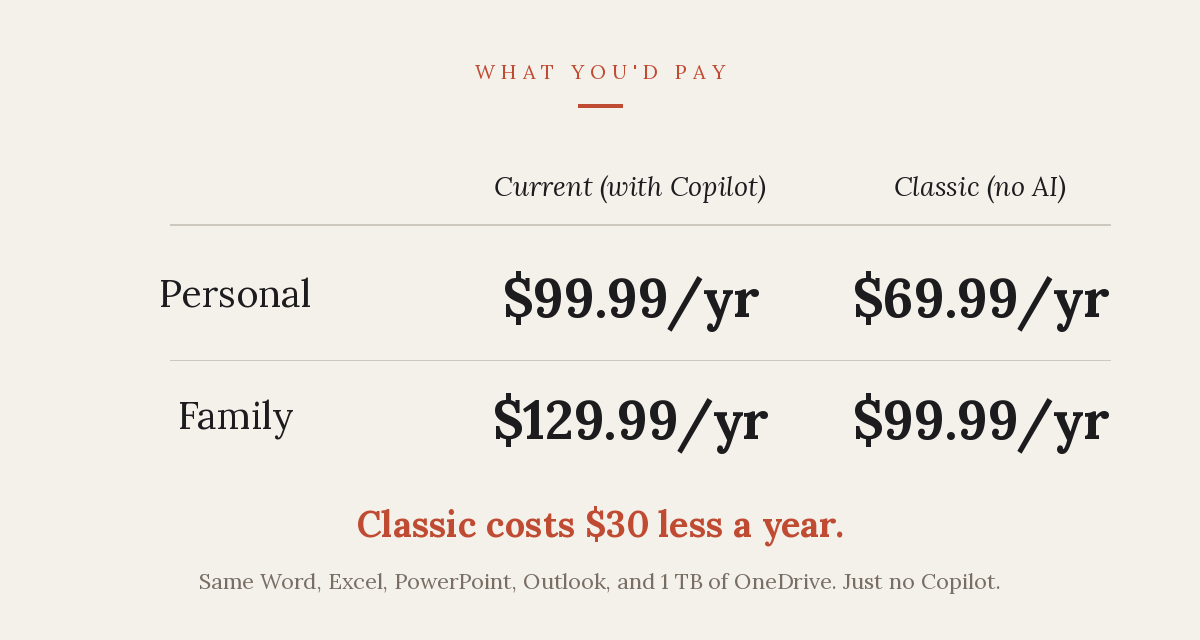
In February 2025, Microsoft folded Copilot into Microsoft 365 Personal and Family. The prices went up to match. Personal went from $69.99 a year to $99.99. Family went from $99.99 to $129.99. That's thirty dollars more on each, every year. The increase hit everyone, new and existing.
Existing subscribers have a third choice, called Classic. Microsoft 365 Personal Classic is $69.99 a year. Family Classic is $99.99. Word, Excel, PowerPoint, and Outlook all included. Even a terabyte of OneDrive storage. No Copilot, with the old price. Microsoft doesn't sell it. They don't advertise it. The offer only appears once you start to cancel your current plan.
The business version is a separate price change on its own timeline, and I wrote about that one here. Classic is only for existing subscribers. If you're buying Microsoft 365 for the first time, the cheaper plan won't be available.
How to switch to Classic
One thing has to be true before you start: auto-renew needs to be turned on. Classic is a swap that takes effect at your next renewal. If you've already switched auto-renew off, the offer won't show up. You'll see 'Turn on recurring billing' instead. Turn it back on. Then walk through these steps. (You can switch it off again later.)
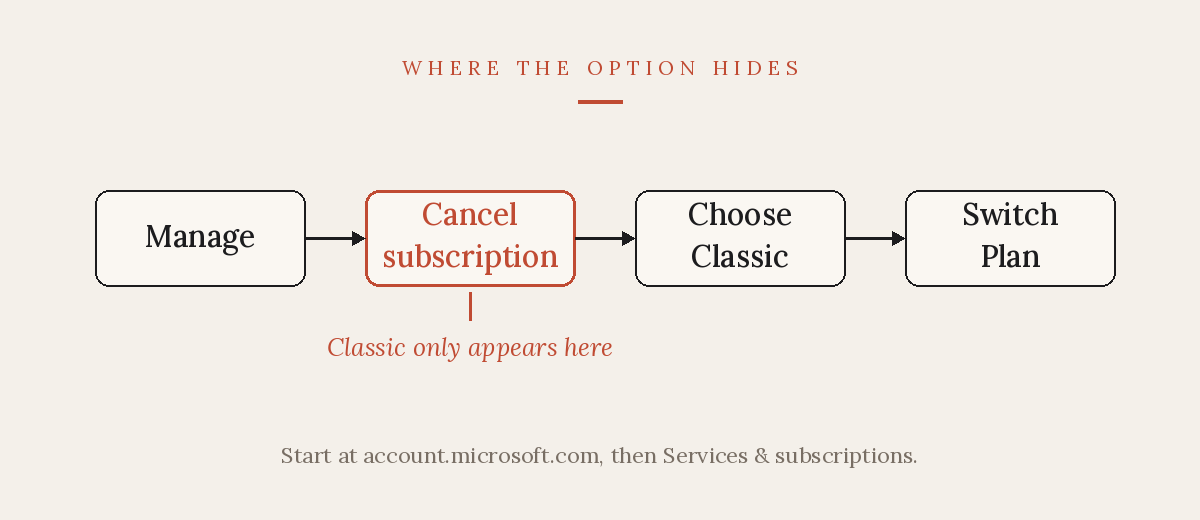
- Go to account.microsoft.com and sign in. Use the same Microsoft account you bought the subscription with. A different account won't show your plan.
- Open 'Services & subscriptions'. Your Microsoft 365 plan is listed there.
- Find your plan and click 'Manage'.
- Click 'Cancel subscription'. Yes, you're clicking Cancel on a plan you want to keep. The button sometimes reads 'Upgrade or Cancel'.
- With any luck, you'll see a list of cheaper plans. Look for 'Microsoft 365 Personal Classic' at $69.99, or 'Family Classic' at $99.99. If you don't see a choice of plans yet, it's because they only load after you've started to cancel. Don't back out before they appear.
- Select the Classic plan and click 'Switch Plan'. Confirm on the next screen.
Once confirmed, nothing will change right away. Your current plan will run until its renewal date. When that date comes, Microsoft charges you the old price instead of the new one. You keep every app you had, minus the Copilot button.
Look out if you use an app store
If you bought Microsoft 365 through an app store, the steps above won't work. Subscriptions from the Apple App Store, Google Play, or a retailer like Amazon are billed by that company, not by Microsoft. So the 'Cancel' and 'Switch Plan' controls live on their side, if they're there at all. Classic may not be offered by them, but you can still call Microsoft and ask.
Some accounts don't get the offer. Others get auto-renewed at the higher price before learning that Classic exists. If that's you, contact Microsoft billing support, ask for Classic by name, and ask about a refund while you're at it.
And treat this as a now-or-never option. Microsoft has hinted it may drop Classic later, or start pulling features out of it. If you want the old price, switch before your renewal date.
Why is Classic so secret?
Putting the cheaper option behind the Cancel button certainly wasn't an accident. We don't click Cancel on a plan we intend to keep. Microsoft is very aware of this. In late October 2025, Australia's consumer regulator, the ACCC, took Microsoft to court over it. The claim is that Microsoft told around 2.7 million subscribers they had two options, accept Copilot at the higher price or cancel. No mention of a third option. Microsoft said it 'could have been clearer.'
The case is still being argued in Australia. But the plan at the center of the lawsuit sits in your US account right now. It's not that any of this is illegal, but the cheaper option is real and Microsoft would rather not make it too easy.
This is a pattern we've seen many times. A company adds AI, raises the price to cover it, then makes the AI-free option hard to find. It's the same shape as Microsoft pushing Windows 10 holdouts toward new hardware or a paid upgrade. You'll see it again, from Microsoft and from others. So before you accept any renewal that jumped in price, try clicking Cancel and see how badly the company wants to keep your business.
If you went looking for Classic and the option never showed up, I want to hear what you saw on screen. You can contact me at joel@freshfromcache.com.
Joel