QuickBooks Desktop is going away.
Intuit is winding down QuickBooks Desktop one version at a time. I priced out your three real options before you're forced to pick one.


If your business runs its books on QuickBooks Desktop, a critical deadline just passed. On May 31, Intuit cut off support for QuickBooks Desktop 2023. Your payroll tax tables are frozen right now if you use that version. Your bank feeds are next.
We don't all run our books on QuickBooks, but a lot of small businesses and nonprofits do. Some have for twenty years. Intuit is winding the whole product down one version at a time. They want everyone on a monthly subscription called QuickBooks Online. The forums are full of people who feel cornered. The good news is we have options. None of them require panic. Just a calendar and a little math.
The phase-out
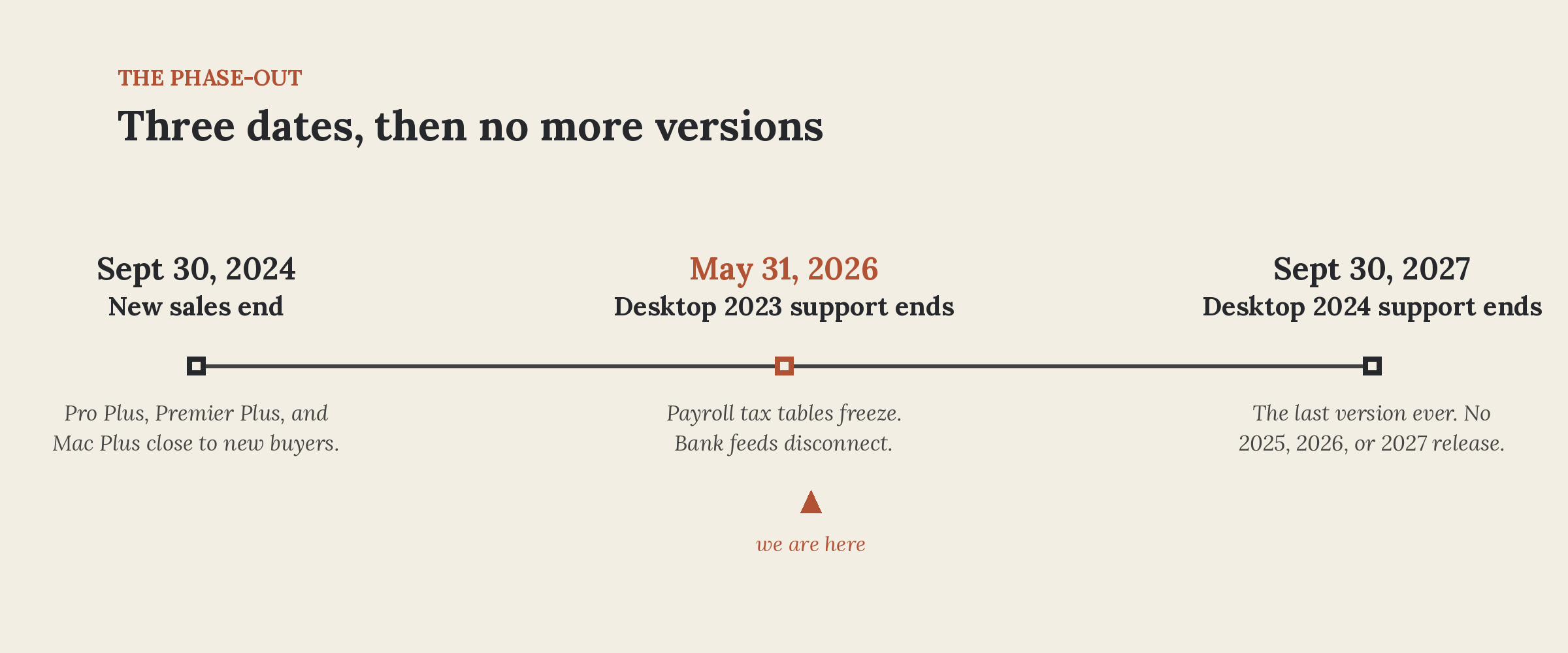
As of September 30, 2024, you cannot buy a new QuickBooks Desktop Pro Plus, Premier Plus, or Mac Plus subscription. Existing subscribers can renew but new customers are locked out.
Support drops on a rolling schedule. Each version gets three years. Desktop 2022 died in 2025. Desktop 2023 died on May 31. That is the one that just happened.
Desktop 2024 is the end of the line. Support for it drops on September 30, 2027. After that, every Desktop user is on unsupported software. (The exception is QuickBooks Enterprise. It is much bigger, vastly more expensive, and still actively sold. It is not the answer for most small businesses.)
What "end of support" means
The software will keep running after the deadline. The file will open. You can even still write checks, enter invoices, and pull reports. What dies is the connection to the outside world:
- Payroll stops. Tax tables freeze. Automated tax calculations end. Stale tax tables mean incorrect paychecks.
- Bank feeds disconnect. Transactions must be imported or entered by hand.
- Payments stop. Card processing inside the app shuts off.
- Invoicing breaks. You cannot email forms directly from the software.
- Security patches end. The code stays frozen with whatever vulnerabilities exist.
- Live support goes dark. If your company file corrupts, nobody is coming to fix it.
This is the Windows 10 playbook. The software doesn't snap in half. The safety net just vanishes piece by piece until staying put becomes the dangerous choice. Even I pointed that out when Microsoft pulled the plug on security updates.
Option 1: Stay on Desktop (for now)
If you are on Desktop 2024, your runway lasts until September 30, 2027. That is fifteen months of fully supported time. For many businesses, riding it out makes sense. Renew, keep working, and map an exit on your schedule.
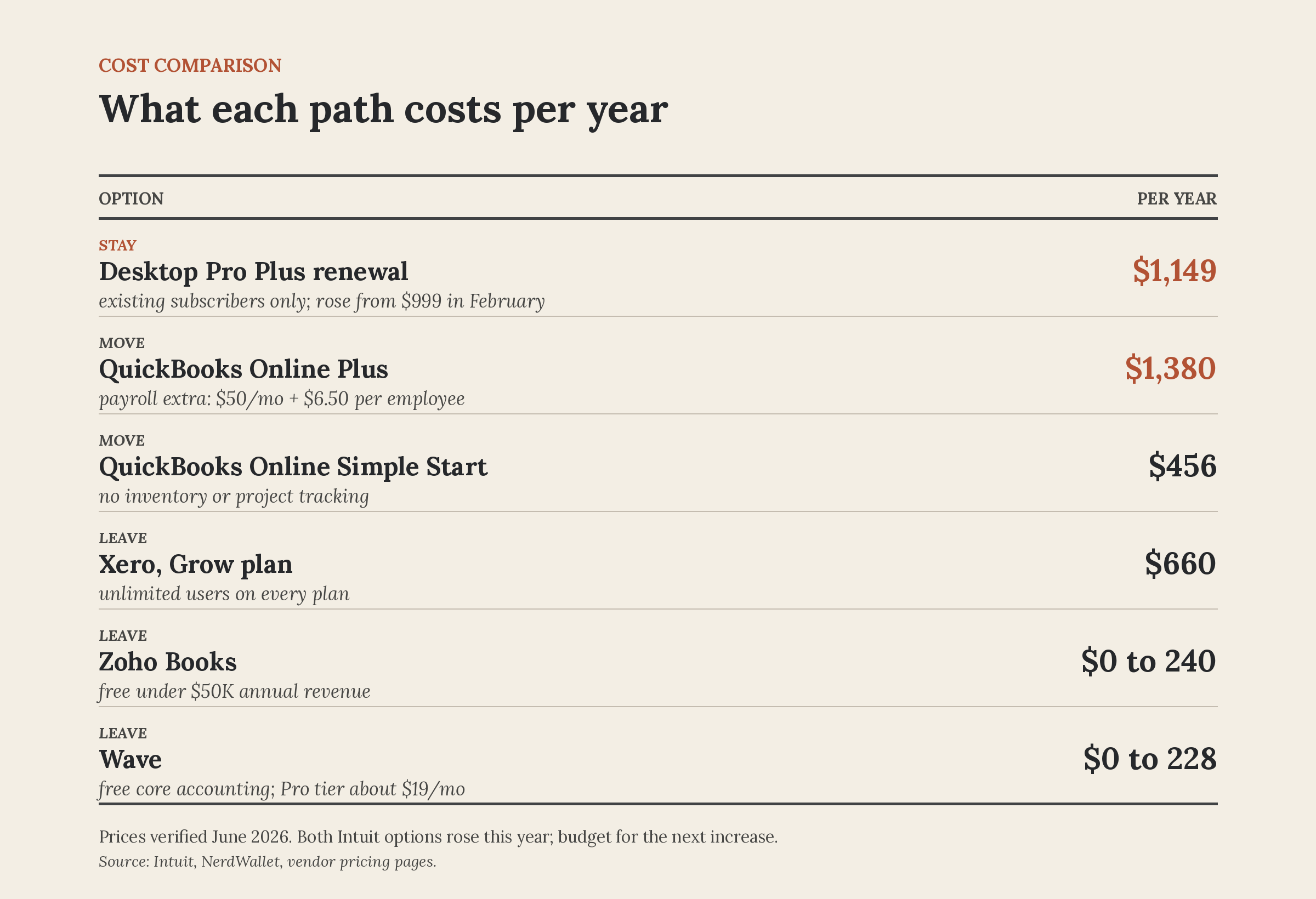
It will cost you, though. Intuit raised Desktop renewal prices on February 1. Pro Plus jumped from $999 to $1,149 a year for a single user. Premier Plus went from $1,399 to $1,609. Extra seats cost more now too. You are paying a premium to stay.
Check your version before you plan anything. Open the app and press F2. The year sits right at the top of the pop-up window. If it says 2023 or older, your safety net is already gone. Your timeline is now.
Option 2: Move to QuickBooks Online
This is the cloud transition Intuit wants. Your books live online, your accountant logs in from anywhere, and backups vanish from your daily checklist.
The pricing moves fast. Simple Start runs $38 a month, Essentials is $75, and Plus hits $115. Most businesses with inventory or project tracking need Plus. That totals $1,380 a year before payroll. Payroll adds another $50 a month, plus $6.50 per employee.
Intuit raised Online rates by 15 to 20 percent last July. The core plans climb an average of 12 to 17 percent every year. Budget for a bigger number next season.
The migration utility is free, and an Intuit rep will move the data over the phone at no charge. Three details trap owners:
- Payroll history vanishes. Past paychecks turn into flat, standard checks. Historical detail must be rebuilt by hand. This is what fills the support forums with nightmare stories.
- Old reports do not map. Run your historical profit and loss statements and balance sheets as PDFs first. Re-creating those exact numbers inside Online later is brutal.
- The clock ticks. You have exactly 90 days to import Desktop data after creating an Online profile. If you miss that window, you start over with a blank file.
Migrate at the start of your fiscal year if you take this path. A clean cutover beats trying to audit a mid-year system split.
Option 3: Leave Intuit
A forced migration is also a chance to shop around. If you're going to learn new software anyway, it doesn't have to be Intuit's.
- Xero runs $25 to $90 a month and includes unlimited users on every plan, which QuickBooks charges extra for. It has a built-in import tool for QuickBooks files.
- Wave is free for core accounting and invoicing. The paid tier is about $19 a month. Best fit for service businesses without inventory.
- Zoho Books has a free plan for businesses under $50,000 in annual revenue, then starts at $20 a month.
- FreshBooks starts at $23 a month and is built mostly for freelancers and very small service shops.
The commercial reality: nearly every bookkeeper and accountant in America knows QuickBooks. Far fewer know Xero. Almost none know Wave or Zoho. Ask your outside CPA (if you have one) what platforms they support before purchasing anything. A cheap app costs more than it saves if your accountant bills you double time to decipher it.
A few steps to take no matter what you choose
- Press F2 in QuickBooks and confirm your version year. That number sets your deadline.
- Save your historical reports as PDFs now. Profit and loss and balance sheet for every year you might ever need. Audits and loan applications don't care that you switched software.
- Export your lists. Chart of accounts, customers, vendors. Every alternative can import them.
- Talk to your bookkeeper or accountant before you commit to anything. Their answer might make the decision for you.
None of this has to happen this week, unless you're on Desktop 2023 running payroll. Then it should. For everyone else, you have time to do this right.
Joel
If you've already made this jump, good or bad, I'd like to hear how it went. Reach me at joel@freshfromcache.com.
Sources:
- Intuit: QuickBooks Desktop 2023 service discontinuation policy
- Intuit: Time limit for importing Desktop data to QuickBooks Online
- Insightful Accountant: Intuit announces pricing changes for QuickBooks Desktop
- NerdWallet: QuickBooks pricing 2026
- NerdWallet: Best QuickBooks alternatives
- QuickBooks Community: Desktop to Online transition threads