Do you need antivirus, or is Windows Defender enough?
Windows Defender is free, already on, and tests level with paid antivirus for most people. What the labs found, who should still pay, and how to cancel McAfee or get a Norton renewal refunded.

There is a red banner in the corner of your screen. It says your antivirus subscription expired, and it has been saying so for a while now. You feel a little guilty every time you see it. Then you close the window and go back to what you were doing.
No need to feel guilty, the computer has been protected the whole time.
Windows 10 and Windows 11 both include Microsoft Defender Antivirus. It is on by default, it updates itself along with Windows, and it is not a trial that runs out. If you have been paying somebody else for an antivirus, you have been buying a second one.
What the research found
Three independent labs test antivirus software on Windows and publish the results for free. AV-TEST in Germany, AV-Comparatives in Austria, and SE Labs in the UK. They collect real malware, run it at real products on real machines, and score what happens. AV-Comparatives states that taking part in its public tests is free of charge, and Microsoft has been in those tests since 2007. Defender is measured against the same paid products on the same tests.
Here is the most recent round, checked in August 2026.
AV-TEST, May and June 2026. Sixteen home security products on Windows 11, all at their default settings. Defender caught 100 percent of the brand-new "zero-day" samples in both months (224 of them) and 100 percent of the 11,772 widespread samples. Perfect score for protection, perfect score for usability. They scored 5.5 out of 6 for performance, which cost it half a point and still earned the TOP PRODUCT award.
AV-Comparatives, February through May 2026. Twenty products, 400 live malicious websites. Kaspersky blocked 399. Bitdefender blocked 398. Avast, AVG and Norton blocked 397. Microsoft Defender blocked 396. Nobody blocked all 400, and it only takes one to ruin your week, so read that as a field that is close rather than a field that is finished. Four months of live threats separated first place from free by three websites.
That same test counts false alarms, meaning the times a product blocks something clean and harmless. Those matter, because a program that cries wolf teaches you to click past its warnings. Defender wrongly blocked zero clean files or sites, the best result of all twenty products. Total Defense was second with one, then ESET with two, then Kaspersky and VIPRE with three each. The average across the field was eight. Trend Micro blocked 83.
SE Labs, April through June 2026. Defender earned AAA, the top award, with 98 percent total accuracy, sitting alongside Kaspersky, McAfee, Sophos, Norton, Avast, Panda and Scanguard.
Where the paid products still win
The paid products do sometimes earn their place.
The paid products typically don't need an internet connection to function. Defender leans hard on Microsoft's cloud to check whether a file is dangerous. In AV-Comparatives' March 2026 test of 10,000 malware samples, Defender's online protection rate was 99.93 percent. Its offline detection rate was 89.2 percent. Bitdefender managed 97.6 percent offline, G DATA 97.8, F-Secure 98.6. If a machine spends any significant time off the internet, one of the paid options would be worth looking at.
They also do better against a targeted attack, which is a person working their way into one specific computer with hacking tools rather than malware sprayed at everybody at once. SE Labs builds those by hand and runs them at each product. Only Kaspersky and Malwarebytes stopped every one. Defender missed a few. So did most of the field.
Most home computers stay online, and almost nobody gets singled out by a person. Both gaps are still real, and any review claiming the free one wins on every measure has not read the tests.
Follow the money
So why does everything you find when you go looking say otherwise?
Start with the laptop. That trial in the corner of the screen is a paid placement. McAfee's own annual report filed with the Securities and Exchange Commission spells it out. The company pre-installs a 30-day free trial with:
- Dell
- HP
- Lenovo
- Asus
- Fujitsu
- Samsung
The annual report also says "in some cases, PC OEMs preinstall a one-year or longer subscription and the OEM pays McAfee a royalty." The same filing shows $188 million spent in a single year on product placement fees and marketing development funds paid to its sales channel. The trial is on your computer because it bought its way in.
Then there are the reviews. Nearly every "best antivirus" page and comparison site earns a commission when you click through and subscribe. That is a legal, disclosed, ordinary arrangement. It means the page makes money when you buy something and nothing at all when you decide you are fine as you are.
Last, the renewal. The price on the offer is the introductory price. Norton's own subscription terms say the price quoted "is valid for the offered introductory term," after which the subscription bills at the applicable renewal price. That renewal is why a lot of people are paying today without even noticing.
Since this one is about who gets paid, here is our side of it. Fresh From Cache earns nothing if you buy an antivirus and nothing if you cancel one.
Who should still pay
Somebody in the house clicks everything. If a family member installs whatever a pop-up suggests, a stricter product with heavier web filtering and better offline detection is a good reason to pay.
You want the bundle and would buy the parts anyway. The paid suites include a password manager, cloud backup, a VPN and parental controls. If you would pay for those separately, a bundle can come out ahead. Price it against the renewal, not the first year.
The machine cannot be kept current. An old system that no longer gets updates is a different problem, and a product with strong offline detection helps. Fixing the updates helps more, and patching is the new password explains why.
A small business is a separate question, and the consumer answer does not transfer. If you have employees, what you actually need is managed detection with somebody watching a console, not a home antivirus subscription multiplied by six. Consumer Defender has no central reporting and nobody reviewing the alerts. AV-Comparatives and AV-TEST both run entirely separate business test series for that reason. Six copies of anything, free or paid, with nobody minding them is not a security program.
On phones and Macs the answer is shorter. macOS and Android both include their own protection, and paid phone antivirus apps mostly sell you a scan and a scare. The real risk on a phone is a link in a text message, and a scanner does not stop you from tapping it.
The uncomfortable part
The FBI's Internet Crime Complaint Center published its 2025 figures this year. Americans reported $20.877 billion in losses. Tech and customer support fraud, meaning the fake pop-up and the phone call that follows it, accounted for $2.13 billion of that. Malware accounted for $19.4 million.
For people over 60 the split is wider. Tech support fraud took $1.04 billion. Malware took $3.4 million.
Almost every dollar is lost to somebody handing it over to another person over the phone. No scanner, free or paid, blocks a phone call. What does help, roughly in order:
- Keep Windows, your browser and your apps updated.
- Use a password manager, so one breach does not open every account. (Start here.)
- Turn on multi-factor authentication for your email and your bank.
- Never paste a command somebody gave you into a Windows box, and never let a caller take remote control of your screen. That is the modus operandi behind the fake CAPTCHA scam.
- Hang up on the pop-up. Microsoft is blunt about this on its own scam page, its error and warning messages never include a phone number. We covered the takedown of one of those operations in police take down major pop-up scams.
- Back up your files, because that is the only real recovery from ransomware. (Do you need backups?)
Which scanner you use comes in somewhere after all of that.
What you can do now
Work these in order. Step one is the safety rail, so nothing gets uninstalled until you have seen for yourself that Defender is on.
1. Confirm Defender is on
Click Start, type "Windows Security," and open it.
On the "Security at a glance" page, click "Virus & threat protection."
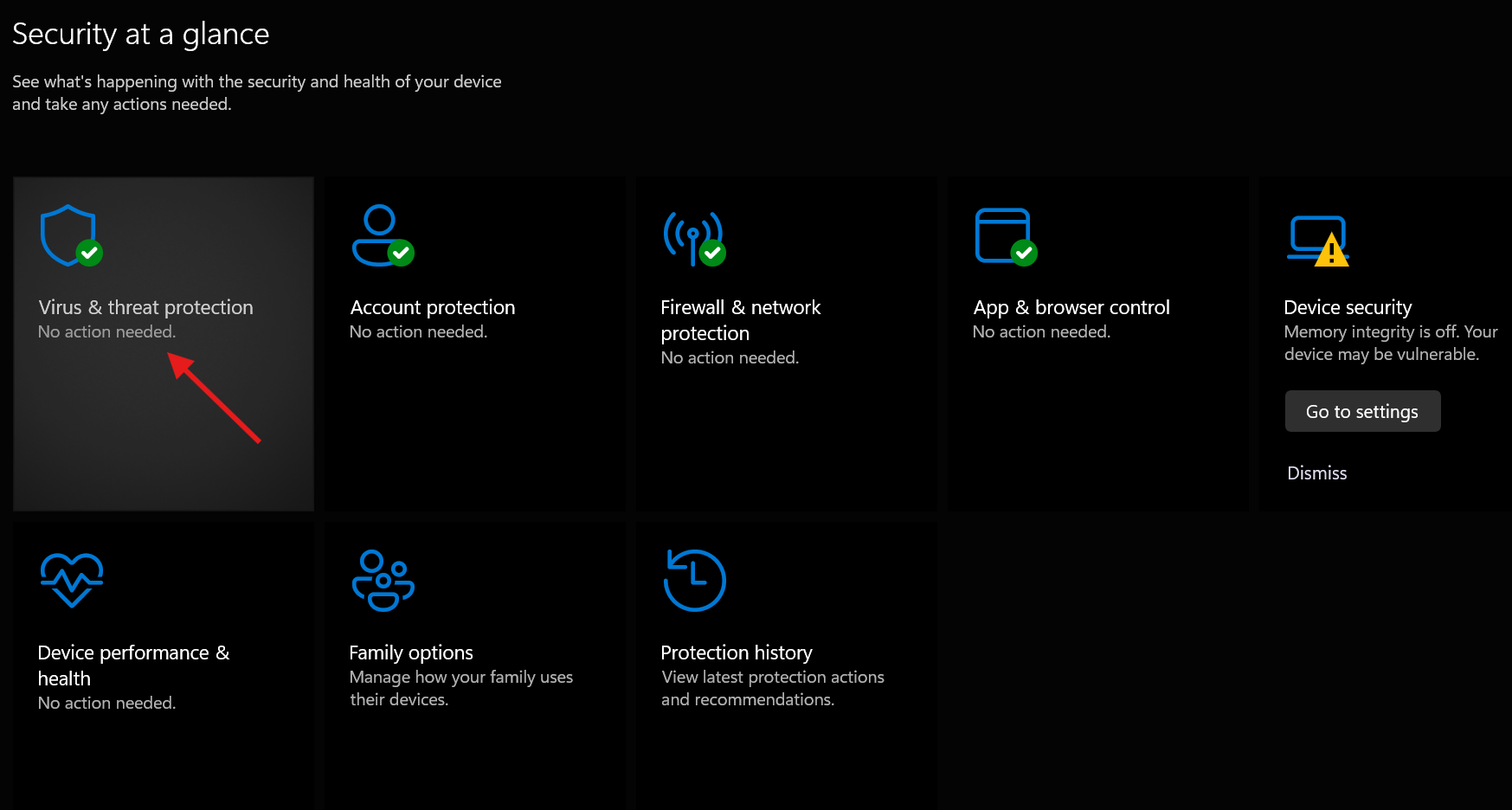
Look under "Virus & threat protection settings." It should say "No action needed."
Then look under "Virus & threat protection updates." It should say the security intelligence is up to date, with a recent time next to "Last update."
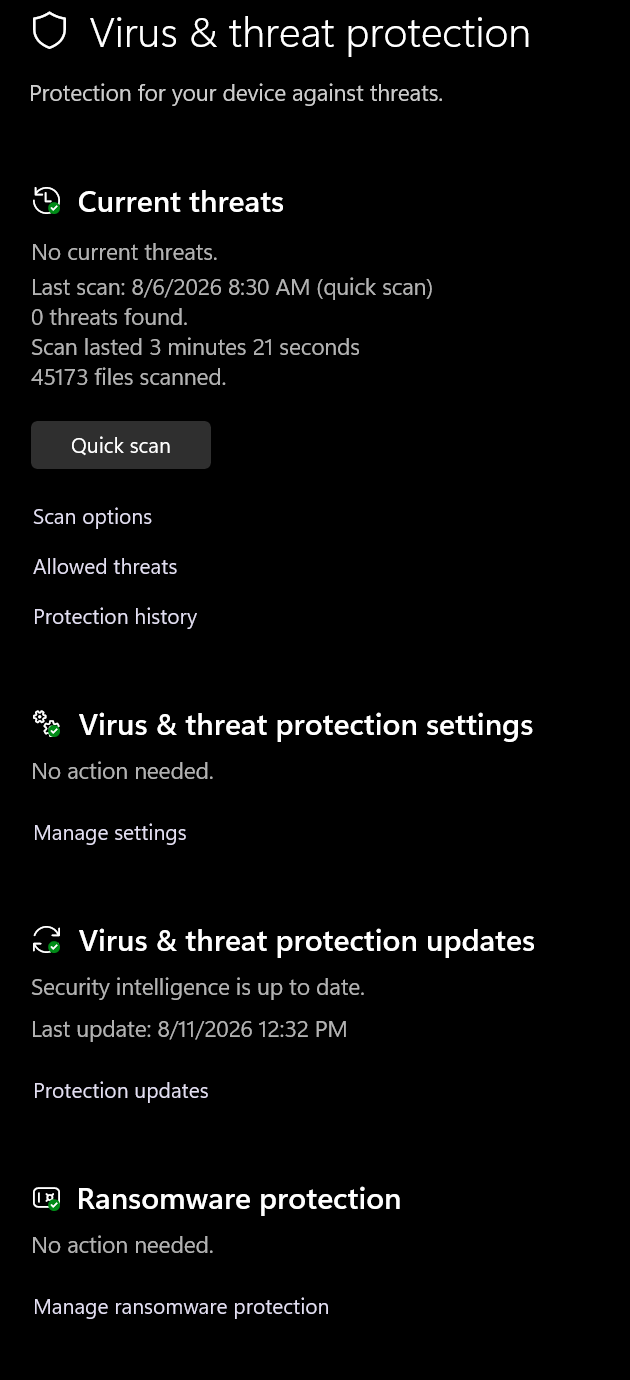
If you want to be sure, click "Protection updates," then "Check for updates." Defender updates itself several times a day, so a "Last update" from this morning is normal, not a coincidence.
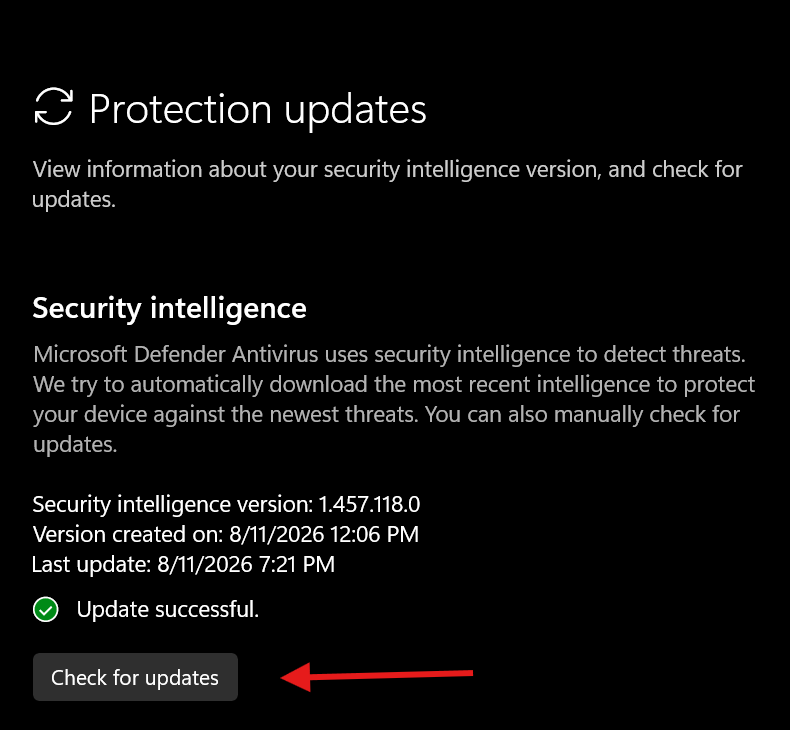
If a paid product is installed and running, Windows names that product on this page instead of Defender. That is expected, and it is the thing you are about to change.
2. Check the two controls people miss
Still under "Virus & threat protection settings," click "Manage settings" and scroll down past real-time protection, cloud-delivered protection and automatic sample submission. Tamper Protection is the fourth one down, and it stops malware from switching your protection off. On a home Windows 11 machine it is normally already on.
If you cannot find it at all, the machine is probably managed by an employer. Microsoft's own instructions only apply to a home user or somebody who is not subject to settings a security team controls. On a work laptop it is either hidden or greyed out, and that is your IT department's call, not yours.
Now go back and click "App & browser control," then "Reputation-based protection settings."
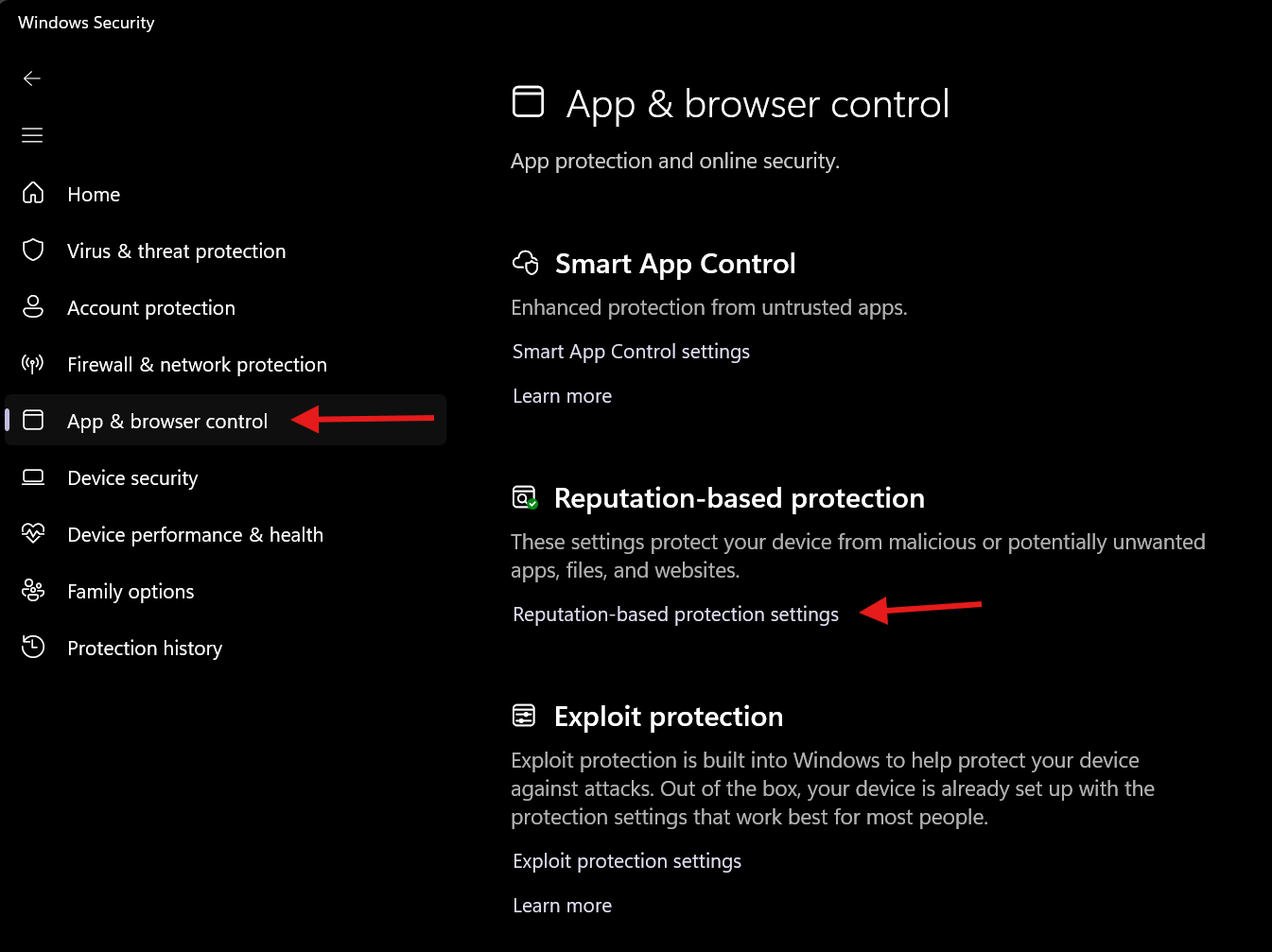
Scroll to "Potentially unwanted app blocking" and turn it on, then tick both "Block apps" and "Block downloads."
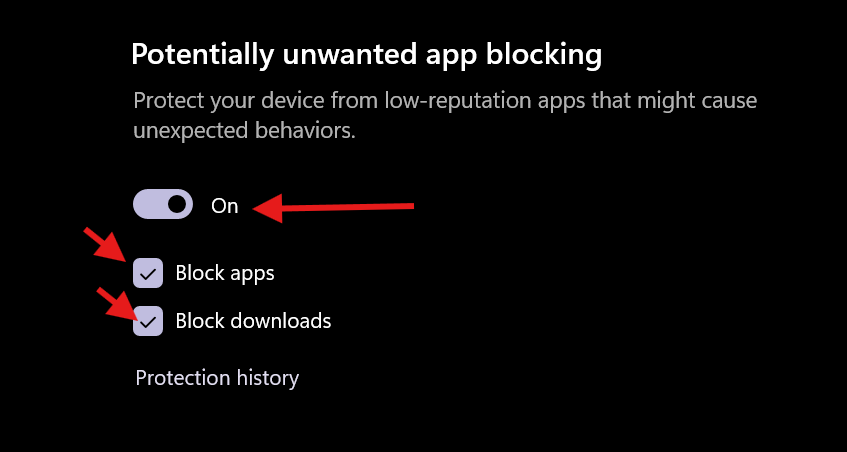
This is the control that catches the toolbars and junk installers that ride along with free downloads, and it is the one most likely to be sitting off.
3. Consider ransomware protection, with a warning
Back in "Virus & threat protection," scroll to "Ransomware protection" and click "Manage ransomware protection."
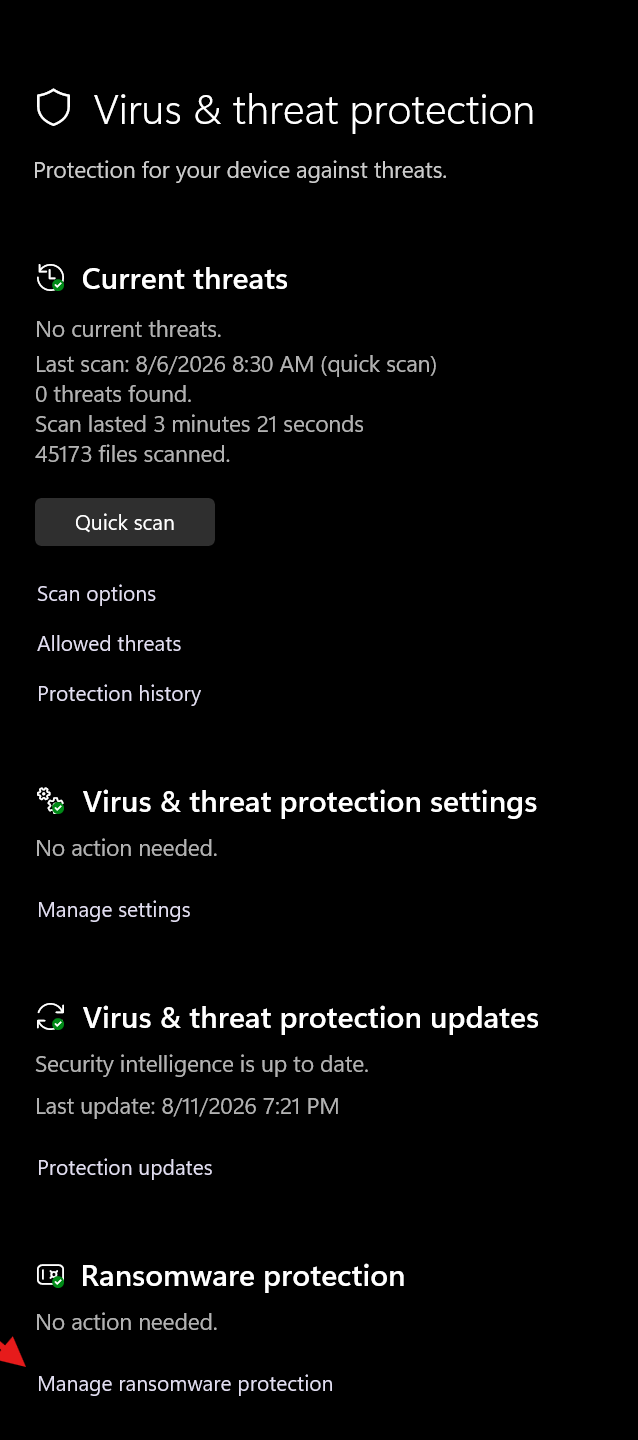
Controlled folder access locks your Documents, Pictures and Desktop so unrecognized programs cannot rewrite them.
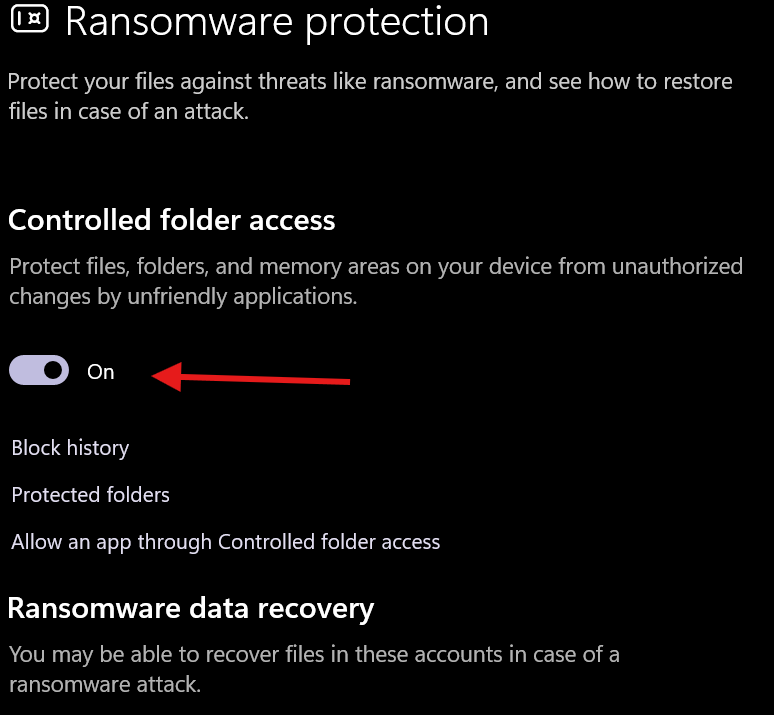
Microsoft leaves it off by default because it also blocks legitimate programs, and you have to allow those by hand when it does. If you have photos you would hate to lose, turn it on and expect to allow a few programs. If a surprise block would panic you, leave it off.
4. Find out what you are actually paying, and where
Sign in to the vendor's account page and look for the subscription and its renewal date. Then check your card or bank statement for the real charge, because the price on the account page and the price on the statement are not always the same.
One more place to look. Some subscriptions bill through the Microsoft Store or an app store rather than the vendor, and those get cancelled where you bought them, not on the vendor's website. This matters for the refund in step six, because McAfee only refunds what you bought from McAfee.
5. Cancel, then remove the software properly
Turn off auto-renewal in your account first.
Then uninstall. On Windows 11 that is Settings, then "Apps," then "Installed apps." On Windows 10 it is Settings, then "Apps," then "Apps & features." Find the product in the list and choose Uninstall.
An ordinary uninstall leaves drivers and services behind, which is why both major vendors publish a cleanup tool. McAfee's is MCPR, the McAfee Consumer Product Removal tool. Norton's is the Norton Remove and Reinstall tool, listed on their site as the Norton 360 Remover. Download either from the vendor's own site, never from a search ad, and run it after the uninstall. Restart when it asks.
6. Ask for your money back
Norton's own policy gives a full refund within 60 days of an annual payment, and each annual renewal payment qualifies on its own. Monthly subscriptions get 14 days.
McAfee's published policy has two windows. Annual subscribers get a full refund if they ask within 30 days of buying. If the subscription auto-renewed, McAfee refunds the most recent renewal charge in full if you ask within 60 days of being charged. Three things to know before you call. McAfee does not prorate, so there is no partial refund for the months you did not use. Monthly subscribers are not eligible for the 30-day guarantee. And it has to be a product you bought from McAfee, so a subscription bought through an app store or a retailer goes back to whoever sold it.
McAfee handles refunds by phone or chat only, so there is no button for this in your account. Norton takes it through support as well.
You do not need a story. "I would like a refund of my most recent renewal under your refund policy, and please confirm auto-renewal is off" is the whole script.
One thing to expect. McAfee's own policy says that after you get the refund you have to uninstall the software, which you already did in step five.
7. Check that Defender took over
Open Windows Security again and go to "Virus & threat protection." It should now name Microsoft Defender Antivirus, with real-time protection on and a recent update. Microsoft's own documentation says Defender re-enables itself once the other product expires or is removed. This is where you confirm it actually did.
One more thing
If you have been paying for this for years, you were not being foolish. You were doing the responsible thing with the information you had. For a long stretch of the 2000s the free option really was worse. It changed. Nobody had a financial reason to tell you.
Sources
Test results: AV-TEST home Windows results (May and June 2026 cycle) · AV-Comparatives Real-World Protection Test, February to May 2026 · AV-Comparatives Malware Protection Test, March 2026 · SE Labs Home Anti-Malware Protection, April to June 2026 · AV-Comparatives funding statement
Microsoft: Defender Antivirus compatibility · Controlled folder access · Manage tamper protection on an individual device · Tech support scams
The money: McAfee Corp. annual report (Form 10-K, fiscal 2021) · Norton subscription and refund terms · McAfee refund policy
Losses: FBI Internet Crime Complaint Center, 2025 Internet Crime Report