Your photos know where you live
I handed an AI a photo with nothing in it, a blank wall and a few trees, no signs. It named the state. Then I gave it a window view with the location scrubbed out, and minutes later it had the exact building and floor.

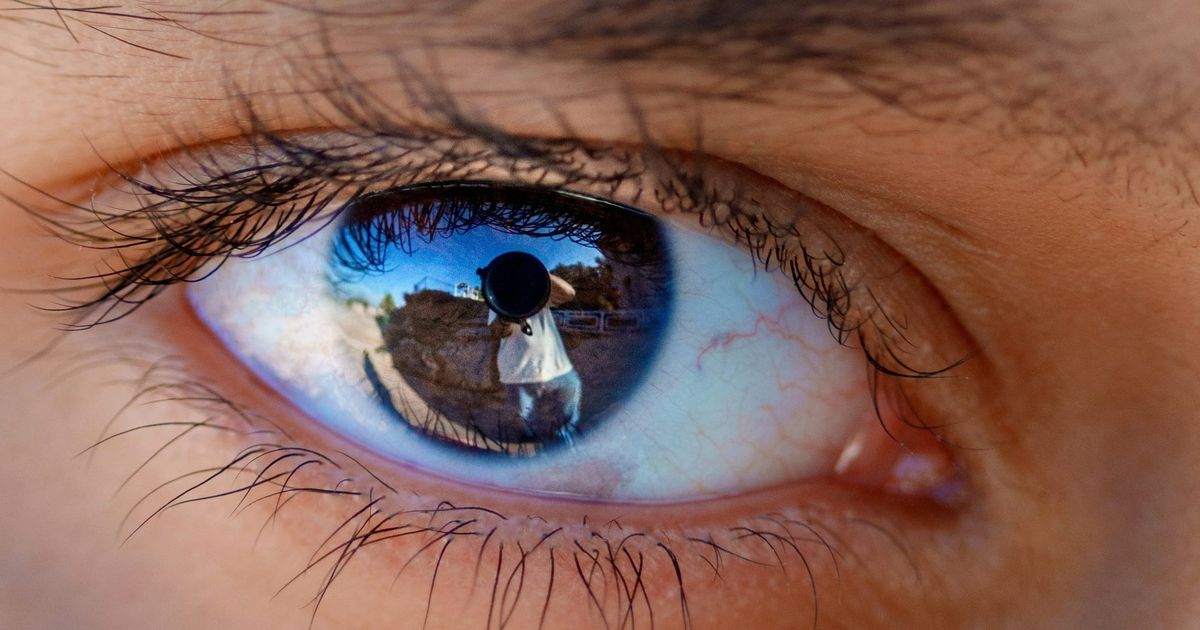
I stumbled upon a story about a man who tracked down a pop singer by using a reflection in her eye from a photo of her. It sounded unbelievable, so I had to try an experiment myself.
Reverse image search has been around for years, and it’s mostly been handy. Find the source of a meme. Check whether a listing photo is stolen. Useful, but often didn’t give many results. This was entirely different.
I opened a fresh chat with an AI assistant (Claude, the one I use, though the same trick went viral with ChatGPT in spring 2025) and handed it a vacation photo from a recent trip to Nassau. A few people and some scenery, nothing I’d have called a giveaway. It named the spot in about two seconds.
So I had to make it a bit harder.
I dug up a photo from almost ten years ago with nothing in it. The corner of a building. A couple of trees. No signs, no numbers, no street. It slowed down, but not by much. It told me I was in the Pacific Northwest, then narrowed to northwest Oregon, going off the architecture. Nothing in that photo said “Oregon” to me, but it saw something I couldn’t.
So I had to try one more time with a little bit more info and a tiny bit of prodding. A photo about seven years old, metadata stripped out, taken looking out of a third-story window onto a street. No street signs or landmarks. Just a few vague outlines of a building in the distance. At first it guessed either Salem or Portland. Close, so I gave it one nudge: Happy Valley. From there it worked out the likely street, then a short list of three candidate buildings. I told it the building wasn’t a hotel and asked it to also guess the floor I was on. After a total of five minutes of me being deliberately stingy with any detail, it had the exact building, floor, and even which side of it I’d been standing on.
I was holding back on purpose to test the theory. But if a photo had even one more detail, it wouldn’t have been even close to a fair fight.
The stalker and a reflection
In 2019, a man in Tokyo tracked down a young pop singer named Ena Matsuoka using her own selfies. He enlarged the photos and studied the scenery reflected in her eyes, picked out the train station she used, and matched it on Google Street View. He studied the curtains and the angle of daylight in videos she’d posted from home to figure out her floor. Then he waited outside her building and attacked her.
That was one obsessed person, tracking her slowly, by hand. The “slowly, by hand” part has completely changed.
AI stripped away the hard parts
In 2023, a few Stanford students built a model called PIGEON that plays GeoGuessr, the game where you get dropped into a random Street View and have to guess where in the world you are. It beat one of the best human players alive, six rounds to none.
Two years later, in April 2025, regular people noticed ChatGPT could do the same thing to any photo you fed it. Someone handed it the inside of a random library; it named the exact library in twenty seconds.
There’s now a tool called GeoSpy that sells this as a service and claims it can get you within a few feet. After a 404 Media investigation turned up people using it to track women, the company pulled its free public version and now sells mostly to law enforcement and vetted businesses. Work that used to take a trained intelligence analyst, or a very determined stalker, is now a free feature anyone can poke at over coffee.
What’s actually happening
The most interesting part of this is that it isn’t reading hidden metadata in the photo file.
Every photo your phone takes can carry hidden tags called EXIF data, and that includes the exact GPS coordinates of where you stood. For years the advice has been simple: strip that data before you post and you’re covered. Most social platforms strip it for you on upload anyway.
That advice is now not good enough. I’d stripped the data out of the apartment and street photo. It found the place (or close to) anyway. The actual picture itself is what gave the location away.
It reads what’s in the frame, the way that stalker did, only faster and across the whole planet at once: the architecture, the trees, the color of the soil, the angle and warmth of the light, the font on a half-covered sign, even which side of the road the cars drive on. My blank wall and two trees said “northwest Oregon” because building materials and plant life are a regional fingerprint, even when nothing in the shot is labeled.
Two different problems
There are really two separate things to worry about.
The first is the file. Even when the AI ignores your metadata, the photo you upload still lands on a company’s servers with whatever GPS tags are baked in, and so does every photo you text or email to a person. Strip the data and that exposure will go away.
The second is the picture. Stripping metadata does nothing here. If the image shows enough of the world, the content is the location, and there’s no field to scrub. The only defense is being careful about what’s in the actual picture.
Both are real concerns; they take different habits to handle.
It’s also wrong, a lot
On easy photos it’s instant. On hard ones it gets the region and then fumbles the specifics. One reviewer fed it a resort photo and it nailed the right island but missed the actual resort by forty-six miles. Plenty of attempts simply fail. PIGEON, the model that crushed the GeoGuessr champ, still had a typical miss measured in tens of kilometers.
The real risk isn’t dramatic. A single beach photo is unlikely to hand a stranger your home address. The slow and deliberate search is the one that works: a few photos, a pattern of posts, and somebody patient feeding it hints. That’s how my window shot went from “somewhere in Oregon” to an exact floor. I’ve written before about not panicking over every new AI headline, and that still holds. This is worth understanding, but not worth losing sleep over.
What to do if you’re concerned
First, turn off your camera’s location tagging. That solves the GPS-in-the-file problem at the source. On iPhone: Settings, Privacy and Security, Location Services, Camera, set to Never. On Android: open the Camera app’s own settings and turn off location tags (the wording can differ depending on which phone and version).
If you’re not sure, you can take a screenshot of your photo instead of posting the original. A screenshot will carry no original metadata. It won’t help with what’s in the content of the photo, but it’s a good habit if you’re worried.
Take a second to look at what’s actually in the shot before you post it. The street outside the window, the view that outs your hotel, or, apparently, even the reflection in someone’s eyes. You don’t have to stop posting, take a look first.
Check the location settings on the apps you post from. Instagram and the others have settings that tag or broadcast where you are; you can turn those down to nobody.
And the easy one that matters most: be stingier with photos of where you live and sleep than with everywhere else.
What about the photos I’ve already posted?
You can’t recall them, and the AI can’t un-see what was already public, so don’t spiral. Going forward, turning off your metadata is the easy move (geotagging). For older posts, be more targeted: delete or lock down the handful of photos that show where you live, or anywhere else you wouldn’t want somebody to easily find.
You don’t have to delete anything to take this seriously. The best change you can make is to look at your own photos the way a stranger might, and to do it before everyone else gets the chance.
If you try this on your own photos, I’d like to hear how it went, especially if it pulled something it had no business knowing. joel@freshfromcache.com.
Joel
Sources
- The stalker who located an idol from reflections in her eyes (2019): Newsweek, "Stalker Finds Japanese Idol's Home From Reflections in Her Pupils," link.
- PIGEON beating a top GeoGuessr player (2023): The Register, "This AI is better than you at figuring out where a street pic was taken just by looking at it," link.
- The April 2025 viral ChatGPT location trend: TechCrunch, "The latest viral ChatGPT trend is doing reverse location search from photos," link.
- GeoSpy and the investigation into its misuse: 404 Media, "The Powerful AI Tool That Cops (or Stalkers) Can Use to Geolocate Photos in Seconds," link.
- The resort photo it missed by 46 miles: TechRadar, "You can't hide from ChatGPT: we tried the viral AI photo-geolocation challenge," link.