Check Your Router's Expiration Date. No Manufacturer Is Required to Tell You It Has One.
Washington spent this month regulating where your router was manufactured. The far more dangerous question is how long anyone will keep patching it, and on that one you are entirely on your own.

On July 22, the FCC voted to bar the sale of any device in the United States containing key hardware components from Chinese companies on its national security list. Chair Brendan Carr said the goal was to "fully close the component part loophole." Meaning that gear which previously slipped through by using restricted parts inside an otherwise-approved product no longer can. The vote also gives the agency room to pull the sales authorization on equipment it had already approved.
This caps a busy stretch. The FCC has spent much of 2026 blocking imports of new foreign router models and tightening the list of manufacturers whose equipment cannot be sold here at all.
Reasonable people can argue about whether any of this makes your home network safer. What I want to point out is a strange gap it exposes.
Enormous regulatory energy is going into where your router was built. Almost none is going into how long its manufacturer will keep updating it. That second question is the one that determines whether you get hacked.
The routers already being used
In May 2025 the FBI put out a bulletin naming thirteen specific router models, most of them Linksys, as actively compromised. Not vulnerable in theory. Compromised, in the field, right then.
The mechanism explains why this keeps happening. These were all end-of-life devices, meaning the manufacturer had stopped issuing firmware updates. A flaw found after that date stays open permanently. Attackers used a malware family called TheMoon to get in through remote administration, the feature that lets you manage your router from outside your house, and then rented the compromised routers out as residential proxies. Criminals pay for proxies because they allow traffic coming from a real home internet connection in Ohio to look legitimate in a way that traffic from a data center does not.
Your router keeps working perfectly the entire time. The Wi-Fi still works. There is nothing to indicate there is a problem. The FBI's rough rule of thumb was that anything dated 2010 or earlier has almost certainly stopped receiving updates, but plenty of gear far newer than that is already abandoned.
Nobody has to tell you
There is no industry standard for how long a consumer router must be supported, and there is no system that notifies you when yours stops.
The typical support window runs somewhere between three and five years, and the clock starts at the product's launch date, not the day you bought it. That detail is more important than it sounds. If you saved money in 2024 by buying a model that came out in 2021, you did not get a discount on a router. You bought most of the way through its supported life.
Manufacturers vary. Netgear publishes an actual end-of-service policy and a list of retired products. Asus and TP-Link publish end-of-life pages, although the dates differ by region and are often tied to whichever foreign certification scheme forced their hand. Singapore and the UK both require support-period disclosure. The United States does not.
This was supposed to be a solved problem. In 2023 the FCC announced the U.S. Cyber Trust Mark, a voluntary security label for smart devices. Scan a QR code, see the security basics, including the minimum support period end date. Exactly the thing a shopper needs and cannot currently get.
Three years later and it is still not running. The framework was adopted in 2024, UL Solutions was named lead administrator, then withdrew in December 2025 amid a federal probe into its ties to China. The FCC named the ioXt Alliance as replacement in April 2026. As of now the program is still not accepting product applications, and the label is voluntary anyway.
So: a hard ban on where the hardware comes from, and a stalled voluntary sticker on how long it gets maintained.
Finding your own answer
You can get to a real answer yourself. Most guides tell you to look up your model number and stop there, which is where people go wrong.
Get the model and the hardware version. Flip the router over. You want both the model number and the hardware revision, printed as something like v1, v2, ver 3.0, or a letter code like B1. For firmware purposes a v1 and a v3 of the same model are different products with different support timelines. Looking up the wrong revision gives you a confidently wrong answer.
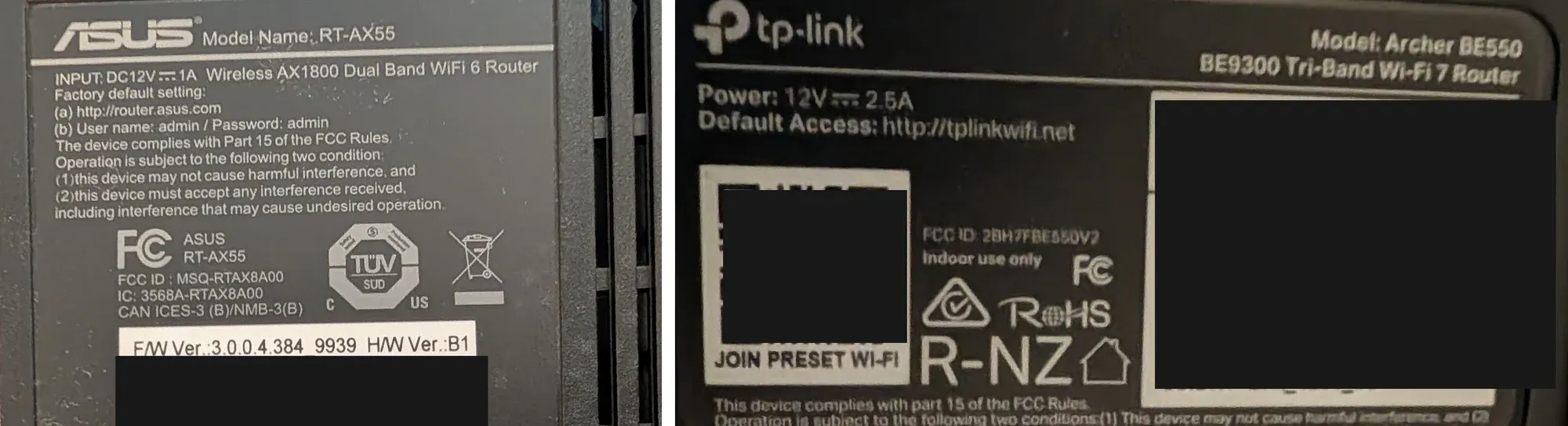
H/W Ver.:B1. The TP-Link on the right prints no hardware version at all.Vendors do not agree on how to show this. TP-Link documents its own convention: a label with no version printed means version 1, and the number at the end of the FCC ID is the hardware version. The Archer BE550 above is the case in point, with no version field anywhere on the label but an FCC ID reading 2BH7FBE550V2, making it hardware V2. ASUS, Netgear, and Linksys publish no equivalent rule, so if you are holding one of those and the label is silent, the manufacturer's support site lists the versions sold and you match on appearance.
Find the date of the most recent firmware release. Search the manufacturer's support site for your exact model and revision, and look at the download page. This date, not any formal announcement, is the number that matters. Most manufacturers never announce end-of-life for consumer gear. They simply stop updating it. If the newest firmware available is more than two years old, treat the device as abandoned regardless of what any support page claims.
Check the retired-products list while you are there. Netgear, Asus, TP-Link, and D-Link all maintain them. Being on the list is a definitive answer. Being absent from it is not, which is why the firmware date comes first.
- Netgear end of service: https://www.netgear.com/about/eos/
- Asus end-of-life list: https://www.asus.com/event/network/eol-product/
- TP-Link end of life: https://www.tp-link.com/us/support/faq/3562/
One caveat. TP-Link and Netgear define end-of-life mainly as production ending and warranty logistics, not as a security-update commitment. That is exactly why the firmware date beats the list.
If your ISP supplied the router, you cannot check any of this. Your provider controls the firmware on a leased gateway and pushes updates on its own schedule. Call and ask two questions: is this model still receiving security updates, and can I swap it for current hardware. Renting an eight-year-old gateway for twelve dollars a month is common, and asking is free.
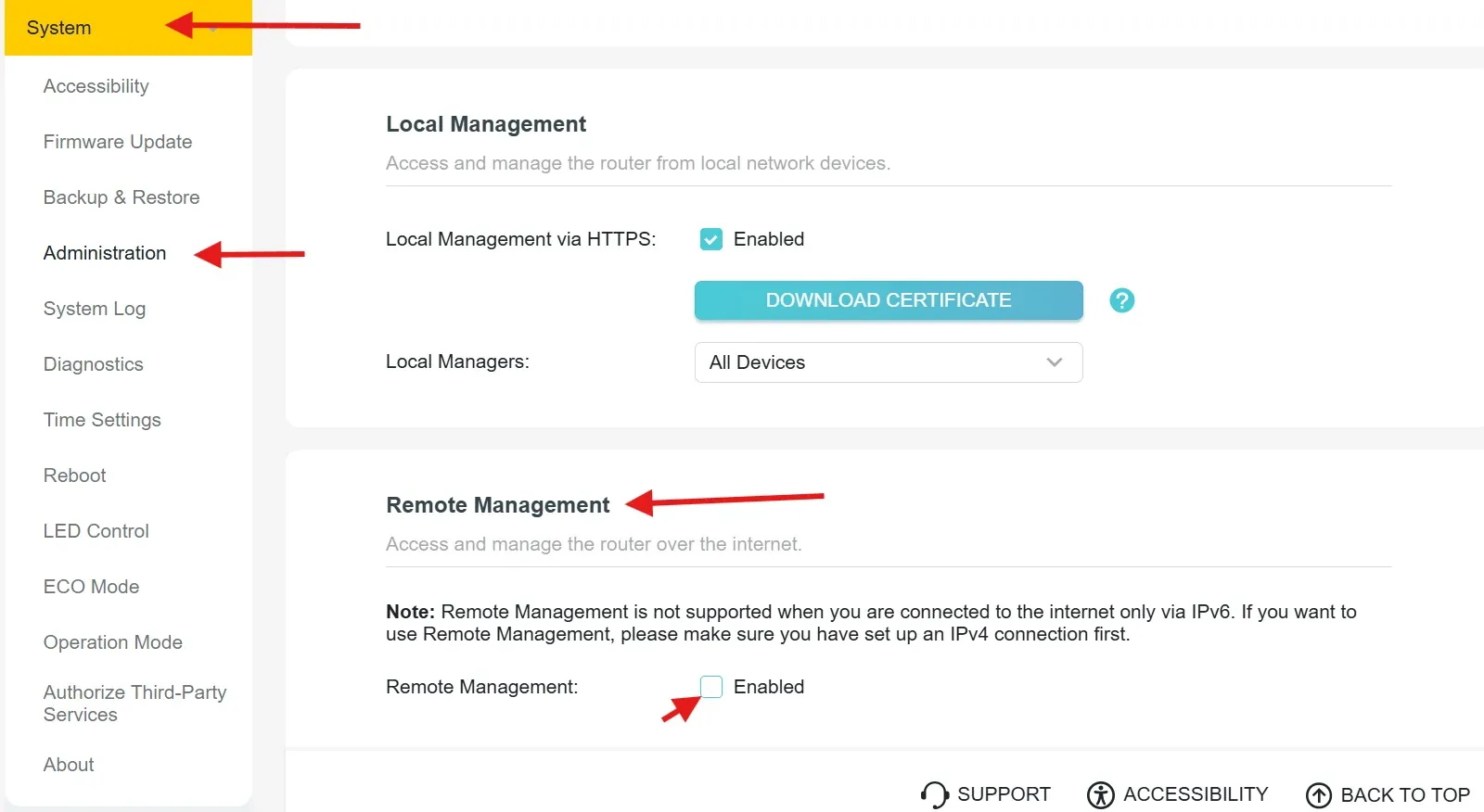
Turn off remote administration right now, no matter what you found. Log into your router, find remote management or remote administration, disable it, save, reboot. This is the specific door TheMoon used to gain access. It takes only a few minutes and it costs nothing. It is the best change you can make right now, particularly if your router turns out to be old and you can't replace it right away.
Getting logged in, since this is where people stall: type 192.168.1.1 into a browser, and if that fails try 192.168.0.1 or 10.0.0.1. The address and default credentials are usually printed on the same sticker as the model number. If your router came from your ISP, there may be no web login at all anymore, since most providers have moved this into their own app.
If none of those work, here is the certain way. On Windows, hit Start, type cmd, and open Command Prompt. Type ipconfig and press Enter. Look for the line reading Default Gateway. That number is your router's address. Type it into your browser exactly as shown.
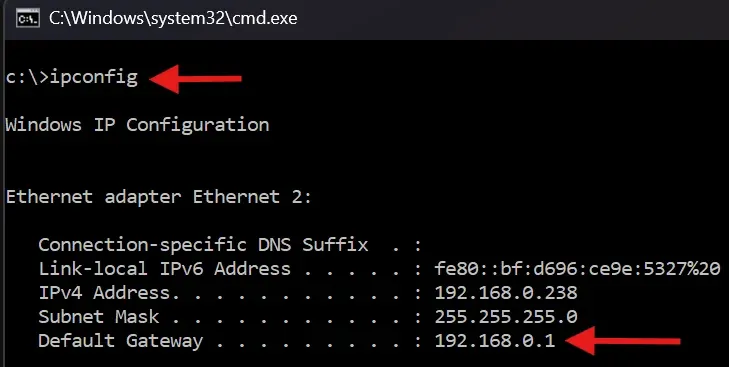
On a Mac you do not need the command line at all: System Settings, then Network, click your active connection, then Details, then TCP/IP. Your router's address is listed as Router.
If you get stuck anywhere in this, or you get logged in and cannot find the remote administration setting, email me. I would rather answer a two-line question than have you skip the step.
When to replace, and what to look for
If firmware stopped two or more years ago, replace it. Not urgently in the sense of tonight, but put it on the list ahead of most things you are currently prioritizing. A competent home router costs less than a nice dinner out and is load-bearing for everything else in your house.
When you shop, ignore the marketing entirely and check one thing: when did this model launch, and does the manufacturer publish a support commitment. Buying the current generation at full price genuinely buys you more supported years than buying the last generation on sale. That is an unusual case where the more expensive option is also the more frugal one.
And when the Cyber Trust Mark eventually appears on boxes, the support end date behind that QR code is the only field on the label that matters.
What isn't coming soon
There is a real policy hole here and it is not the one Washington is arguing about.
A router is a computer that runs continuously for a decade, sits between every device you own and the internet, and probably only gets thought about when you have to reboot it. We have collectively decided that manufacturers may stop maintaining that computer whenever it stops being commercially interesting, without telling anyone, and that the owner is responsible for noticing.
That is not a supply chain problem. You cannot fix it by restricting where the parts came from. Until disclosure is mandatory rather than voluntary, the only working defense is relying on people to remember to check the date on their router like it's a gallon of milk. Enough people will simply forget, and that is what keeps the attack surface valuable.
Go find out if your router has already expired.